


Why Your AI Agent Needs Semantic Tool Discovery
As AI agents gain access to hundreds of tools through MCP servers, traditional tool selection breaks down. Learn how vector search and RAG can reduce prompt tokens while improving tool selection accuracy.
Want to try this yourself? Check out the MCP-RAG repository on GitHub and see semantic tool selection in action with our free, open-source MCP Connect Inspector UI. Follow our step-by-step guide to set it up and watch vector search reduce your token usage by 89%.
The Model Context Protocol has unlocked something remarkable: AI agents can now seamlessly integrate with dozens, even hundreds, of tools. GitHub's MCP server alone exposes over 90 operations. Slack, Linear, databases, APIs—the ecosystem grows daily.
But here's the problem: current AI agents send every single tool definition to the LLM on every request.
When you ask Claude to "create an issue in my repo," it receives descriptions for all available tools, even though it only needs create_issue. That's wasted tokens. Multiply this across conversations, and costs add up while response quality can degrade from information overload.
The Challenge: Too Many Tools
Let's look at a concrete example. When you connect a GitHub MCP server to an AI agent, you expose over 90 tools. Without intelligent filtering, every request includes:
- Tool names and descriptions
- Parameter schemas for each tool
- Return type definitions
- Required vs optional parameter flags
This information repeats for every single tool in every single request, even when most tools are completely irrelevant to the user's query.
How Semantic Tool Discovery Works
Traditional tool selection is binary: include everything or nothing. Semantic discovery uses vector embeddings to match user intent with relevant tools.
Here's the flow:
-
Index Phase (one-time): Generate embeddings for every tool, parameter, and return type. Store these in a vector database like Neo4j.
-
Query Phase (every request): Embed the user's query, search for semantically similar tools, and send only the top matches to your LLM.
Instead of sending all available tools when someone asks "create an issue," you send the most semantically relevant ones: create_issue, update_issue, create_issue_comment.
The Decomposed Approach
Most tool selection systems embed only tool names and descriptions. MCP-RAG uses a decomposed approach that indexes tools at a granular level:
// Instead of just:
Tool → Embedding

// We decompose:
Tool → Embedding
  ├─ Parameter 1 → Embedding
  ├─ Parameter 2 → Embedding
  └─ Return Type → Embedding
This granular approach means queries like "add a comment about the bug" will match not just tools with "comment" in their name, but also tools with comment parameters or return types.
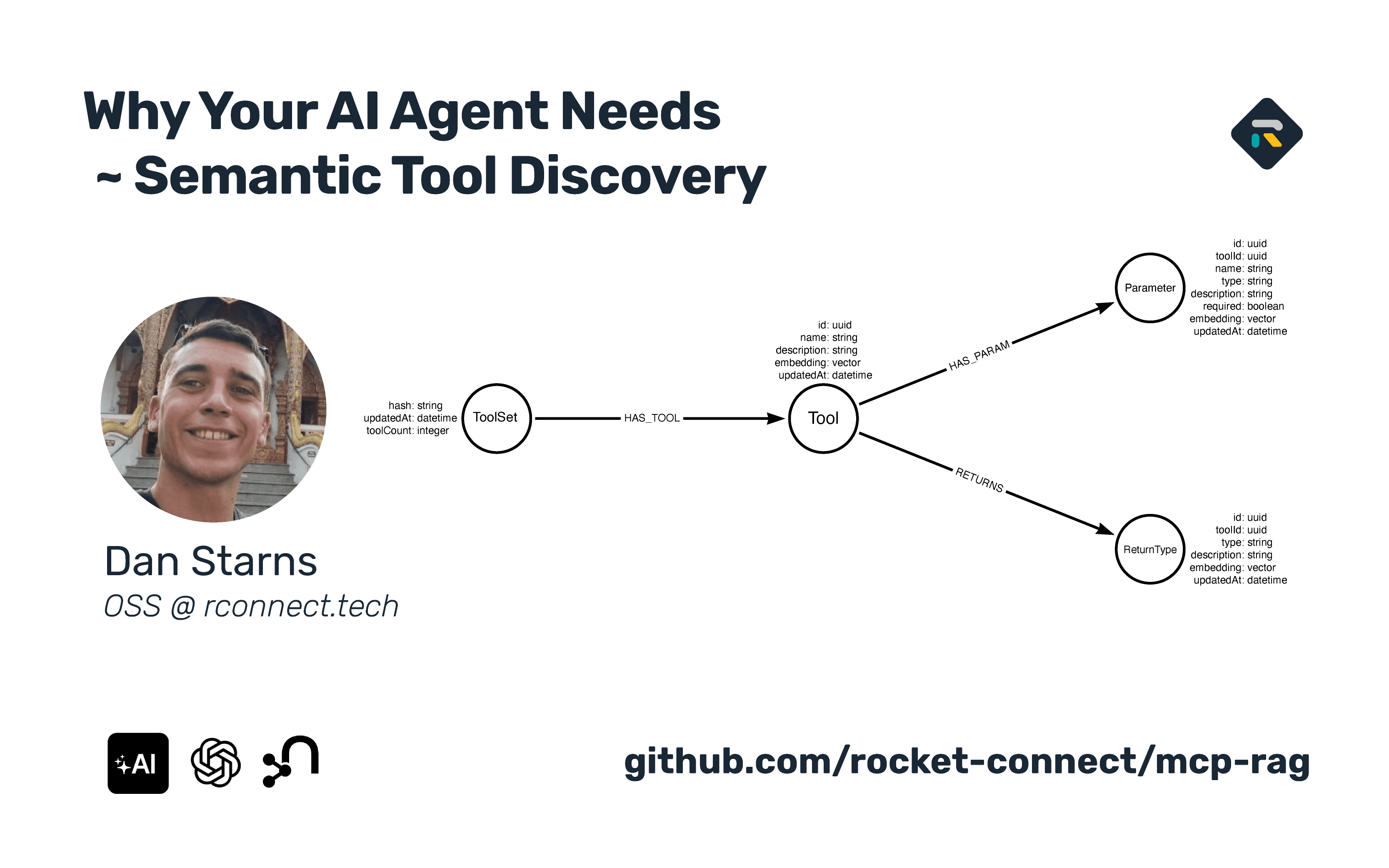
In Neo4j, this creates a graph structure:
(ToolSet)-[:HAS_TOOL]->(Tool)
(Tool)-[:HAS_PARAM]->(Parameter)
(Tool)-[:RETURNS]->(ReturnType)

Each node (Tool, Parameter, ReturnType) has its own vector embedding, enabling nuanced semantic matching across the entire tool schema.
Real-World Results
We benchmarked MCP-RAG against traditional tool selection using a GitHub server scenario with 90+ tools across 5 different queries in a sequential conversation. The tests simulate realistic multi-turn interactions where context accumulates across prompts.
Benchmark Methodology: Each test runs 5 sequential prompts that trigger different tools, mirroring real-world agent conversations. Both approaches use the complete GitHub MCP Server toolset (90+ tools) to represent authentic large-scale scenarios.
Performance Comparison
Both approaches achieved 100% accuracy (5/5 tests passed), demonstrating that RAG maintains perfect tool selection while dramatically improving efficiency.
| Metric | Base Tool Selection | RAG Tool Selection | Improvement |
|---|---|---|---|
| Average Response Time | 4,595 ms | 1,742 ms | 62.1% faster |
| Total Response Time | 22,975 ms | 8,710 ms | 62.1% faster |
| Min Response Time | 2,019 ms | 1,532 ms | 24.1% faster |
| Max Response Time | 8,627 ms | 2,190 ms | 74.6% faster |
Token Efficiency
| Metric | Base Tool Selection | RAG Tool Selection | Reduction |
|---|---|---|---|
| Total Tokens | 47,323 | 5,164 | 89.1% reduction |
| Average Tokens/Test | 9,465 | 1,033 | 89.1% reduction |
| Prompt Tokens | 47,161 | 5,002 | 89.4% reduction |
| Completion Tokens | 162 | 162 | No change |
Individual Test Performance
| Test Case | Base Response Time | RAG Response Time | Token Reduction |
|---|---|---|---|
| Get PR #42 | 7,808 ms | 1,659 ms | 91.7% |
| List Issues | 2,446 ms | 1,653 ms | 86.1% |
| Create Issue | 2,019 ms | 1,676 ms | 88.5% |
| Get README | 2,075 ms | 2,190 ms | 91.6% |
| Add Comment | 8,627 ms | 1,532 ms | 87.5% |
Key Findings:
- RAG reduces token usage by approximately 89%, translating to significant cost savings
- Response times improve by over 60% on average, enhancing user experience
- Perfect accuracy maintained across all test cases
- More consistent performance with lower variance across runs
These benchmark results are automatically generated from the test suite. View the latest performance data:
- Base Tool Selection Results - Baseline approach
- RAG Tool Selection Results - RAG-powered filtering
- View Test Suite - Complete implementation
Sample Query Results
Query: "Get pull request #42 from rocket-connect/mcp-rag"
- Selected tool:
get_pull_request - Tokens used: 785
- Response time: 1,659ms
Query: "List all open issues in the repository rocket-connect/mcp-rag"
- Selected tool:
list_issues - Tokens used: 1,309
- Response time: 1,653ms
Query: "Create a new issue in rocket-connect/mcp-rag with title 'Test Issue' and body 'This is a test'"
- Selected tool:
create_issue - Tokens used: 1,088
- Response time: 1,676ms
Query: "Get the contents of the README.md file from the main branch in rocket-connect/mcp-rag"
- Selected tool:
get_file_contents - Tokens used: 795
- Response time: 2,190ms
Query: "Add a comment to issue #1 in rocket-connect/mcp-rag saying 'This is a test comment'"
- Selected tool:
create_issue_comment - Tokens used: 1,187
- Response time: 1,532ms
Every query selected the correct tool on the first try. The system successfully matched natural language queries to specific GitHub operations through semantic similarity.
Why Vector Search Works
Traditional keyword matching struggles with natural language queries:
Query: "Let the team know about the deployment"
Keyword Match: Looks for exact words like "team", "know", "deployment"
Problem: Misses tools like send_message, post_to_channel, notify_users
Vector Match: Understands semantic similarity Success: Correctly finds messaging and notification tools
Vector embeddings capture meaning rather than just matching words. They understand that "let the team know" and "send a message" are semantically similar, even without word overlap.
Implementation: Core Components
The MCP-RAG implementation consists of two main packages:
1. Neo4j Package (@mcp-rag/neo4j)
Handles all graph database operations through a CypherQueryBuilder class that generates parameterized Cypher queries:
Tool Indexing: The createDecomposedTools method stores tool schemas with vector embeddings in a graph structure.
Vector Search: The vectorSearchDecomposed method queries using Neo4j's native vector index with configurable similarity thresholds.
Schema Management: Methods like createVectorIndex and checkVectorIndex manage the vector index infrastructure.
2. Client Package (@mcp-rag/client)
Provides the high-level API as a wrapper around the AI SDK:
import { createMCPRag } from '@mcp-rag/client';
import { openai } from '@ai-sdk/openai';
import neo4j from 'neo4j-driver';

const rag = createMCPRag({
  model: openai('gpt-4'),
  neo4j: driver,
  tools: {
    // Your MCP tools here
  },
  openaiApiKey: process.env.OPENAI_API_KEY,
});

// Sync tools to Neo4j
await rag.sync();

// Generate text with automatic tool selection
const result = await rag.generateText({
  prompt: 'create an issue about the bug',
});
The client uses OpenAI's text-embedding-3-small model (1536 dimensions) for generating embeddings, creating a consistent embedding space for all tool components.
The Sync Process
The sync() method is where the indexing happens:
-
Creates Vector Index: Sets up a Neo4j vector index for cosine similarity search with 1536 dimensions
-
Generates Embeddings: For each tool, creates embeddings for:
- The tool itself (name + description)
- Each parameter (name + description)
- The return type
-
Builds Graph Structure: Creates nodes and relationships in Neo4j using the decomposed model
-
Idempotent Design: Uses
MERGEoperations so multiple syncs won't create duplicates
The sync process is required before first use and should be called again if you modify your toolset with addTool() or removeTool().
Toolset Hashes
Hashes uniquely identify toolset versions for change detection and multi-version support.
How Hashes Work
- Serialization – Tools are deep-cloned (excluding
executefunctions) - Sorting – Tools sorted by name, all nested keys sorted recursively
- Hashing – JSON string passed to hash function
// Hash changes when tools change
const hash1 = rag.getToolsetHash();
rag.addTool('newTool', myTool);
const hash2 = rag.getToolsetHash(); // Different from hash1
The default hash uses a bitwise function returning toolset-<hex>. You can provide a custom hash function for browser environments:
const rag = createMCPRag({
  // ...
  hashFunction: (input) => {
    const encoder = new TextEncoder();
    const data = encoder.encode(input);
    const hashBuffer = await crypto.subtle.digest('SHA-256', data);
    return Array.from(new Uint8Array(hashBuffer))
      .map((b) => b.toString(16).padStart(2, '0'))
      .join('');
  },
});
Hash Properties
- Deterministic – Same toolset always produces same hash
- Order-independent – Tool/property order doesn't affect hash
- Change-sensitive – Any definition change produces different hash
Migrations
Migration syncs tool definitions to Neo4j, creating the graph structure for vector search.
Migration Flow
- Check – Determines if migration needed (hash exists in Neo4j?)
- Index – Creates vector index (1536 dimensions, cosine similarity)
- Embed – Generates embeddings for tools, parameters, return types
- Store – Creates graph structure in Neo4j
Custom Migration Hooks
const rag = createMCPRag({
  // ...
  migration: {
    shouldMigrate: async (session) => {
      const result = await session.run('...');
      return result.records.length === 0;
    },
    migrate: async (session, tools) => {
      // Your migration code
    },
    onBeforeMigrate: async (statements) => {
      console.log('Migrating:', statements.length, 'statements');
      return statements;
    },
  },
});
Multi-Version Toolsets
Multiple toolset versions can coexist in Neo4j:
// Version 1
await rag.sync();
const v1Hash = rag.getToolsetHash();

// Version 2 (both exist in DB)
rag.addTool('newTool', myTool);
await rag.sync();
const v2Hash = rag.getToolsetHash();

// Manage versions
const v1Info = await rag.getToolsetByHash(v1Hash);
await rag.deleteToolsetByHash(v1Hash); // Clean up old version
The generateText Flow
When you call rag.generateText(), here's what happens:
-
Ensures Sync: Automatically runs sync if tools haven't been indexed
-
Semantic Selection:
- Generates an embedding for your prompt using the same model
- Performs Neo4j vector similarity search
- Retrieves the top N most relevant tools (default: 10)
-
Passes to AI SDK: Calls the standard AI SDK
generateTextwith only the selected tools -
Returns Full Result: Returns the complete AI SDK result including tool calls, token usage, and response content
This means MCP-RAG is a drop-in replacement for the AI SDK—it accepts the same parameters and returns the same result structures.

When to Use Semantic Tool Discovery
RAG-based tool selection makes sense in specific scenarios:
Consider RAG When:
- You have 20+ tools from one or more MCP servers
- Your tools have overlapping functionality
- Users make natural language requests with ambiguous intent
- You're building production agents with token/cost concerns
- You're integrating multiple MCP servers with combined tool counts of 50+
RAG May Not Be Needed If:
- You have fewer than 10 clearly distinct tools
- Tool selection is straightforward with no ambiguity
- You're prototyping and token efficiency isn't a priority yet
- Your tools have very different purposes with minimal overlap
Getting Started
The MCP-RAG project is open source and available on GitHub:
Repository: rocket-connect/mcp-rag
The monorepo includes:
packages/client: High-level wrapper around AI SDK with semantic tool selectionpackages/neo4j: Neo4j-specific Cypher query builder and graph operationsbenchmarks: Test suite with GitHub tool selection benchmarks comparing RAG vs baselineexamples/github: Complete working example with 93 GitHub MCP tools
Installation:
npm install @mcp-rag/client @ai-sdk/openai neo4j-driver ai

export OPENAI_API_KEY=your_key_here
You'll need:
- A Neo4j instance (cloud or local via Docker)
- An OpenAI API key for embeddings (uses
text-embedding-3-small) - Your MCP tools as AI SDK tool definitions
Running the Benchmarks
To see the system in action:
git clone https://github.com/rocket-connect/mcp-rag
pnpm install

export OPENAI_API_KEY=your_key_here
export NEO4J_URI=neo4j://localhost:7687
export NEO4J_PASSWORD=your_password

cd benchmarks
pnpm test
The benchmark suite outputs detailed metrics including token counts, response times, and success rates. Results are saved in benchmarks/results/ with both latest snapshots and timestamped history.
The GitHub Example
Want to see MCP-RAG with real tools? The examples/github directory demonstrates the complete workflow:

- Mocks all 93 tools from the GitHub MCP server
- Syncs them to Neo4j with embeddings
- Performs vector similarity search on user prompts
- Shows the top 10 selected tools with debug output
- Allows interactive testing with different queries
This example is perfect for understanding how semantic search reduces context overhead in production scenarios.
What's Next
The MCP ecosystem is evolving rapidly. Potential future enhancements include:
- Custom Embedding Models: Support for other embedding providers beyond OpenAI
- Adaptive Tool Selection: Dynamically adjusting the number of retrieved tools based on query complexity
- Context-Aware Filtering: Using conversation history to bias tool selection toward recently used tools
- Tool Composition: Chaining multiple tools together based on semantic relationships in the graph
- Multi-Vector Search: Combining tool embeddings with parameter and return type embeddings for more nuanced matching
Final Thoughts
As MCP servers proliferate and AI agents gain access to more capabilities, intelligent tool selection becomes increasingly important. Sending every tool definition on every request doesn't scale—it wastes tokens, increases latency, and can overwhelm the model with irrelevant context.
Semantic tool discovery via vector search addresses this elegantly. The implementation is relatively straightforward: wrap the AI SDK, generate embeddings for tools at initialization, and perform similarity search on each request. The results speak for themselves: 89% reduction in tokens with 62% faster response times, all while maintaining perfect accuracy.
MCP-RAG provides a production-ready foundation for building AI agents that can scale to hundreds of tools while maintaining fast responses and accurate tool selection. It's a drop-in replacement for the AI SDK that adds semantic intelligence without changing your existing workflow.
Try It Yourself
Ready to see semantic tool selection in action? Our free, open-source MCP Connect Inspector UI lets you experiment with vector search directly in your browser.
Follow our step-by-step guide to:
- Connect your MCP servers
- Set up Neo4j for vector search
- Watch semantic selection reduce tokens in real-time
- Compare before/after metrics on your own queries
Resources
- Try Now: MCP Connect Inspector UI
- Step-by-Step Guide: Semantic Tool Selection in Practice
- GitHub: rocket-connect/mcp-rag
- Twitter: @dan_starns
- LinkedIn: Daniel Starns
- Company: Rocket Connect
Dan Starns is the Founder & CTO of Rocket Connect, former core contributor to Neo4j, and advocate for graph databases in AI applications. He's currently based in Southeast Asia, organizing developer events and building tools to make AI agents more efficient.